

This app automates the retrieval of financial documents (bank statements, invoices, receipts) from web portals by running a browser locally on your device and using an AI agent to navigate pages on your behalf. This document explains exactly what data stays on your device, what leaves it, and why.
We built this as a local-first tool because we believe you should not have to upload your financial credentials or documents to a third-party cloud to automate document fetching. This doc is written for security-conscious users who want to verify that claim.
Hard Guarantees
What We Never Do
These are hard guarantees enforced by the architecture — not policy promises:
Never store your credentials in our cloud.
Credentials are encrypted with the OS secure storage API and stored in a local database. There is no API endpoint, cloud function, or upload path for credentials.
Never upload your downloaded financial documents (PDFs, statements, invoices) to our servers.
Documents are written directly to local disk by the download watcher. No upload code path exists.
Never route downloads through our servers.
The browser connects directly to your financial portal. Downloads flow from the portal to a local output directory on your device.
Never send raw, unredacted page content or screenshots to the AI.
All browser tool outputs pass through the redaction pipeline before reaching the LLM.
Never include your passwords in AI prompts or conversation history.
Credentials are injected at browser execution time and scrubbed from tool outputs immediately after.
Never send document content, financial amounts, or PII in telemetry.
Telemetry fields are structurally limited to safe enums, counts, and timing values.
Architecture Diagram
Data Flow
What leaves the device, when, and why.
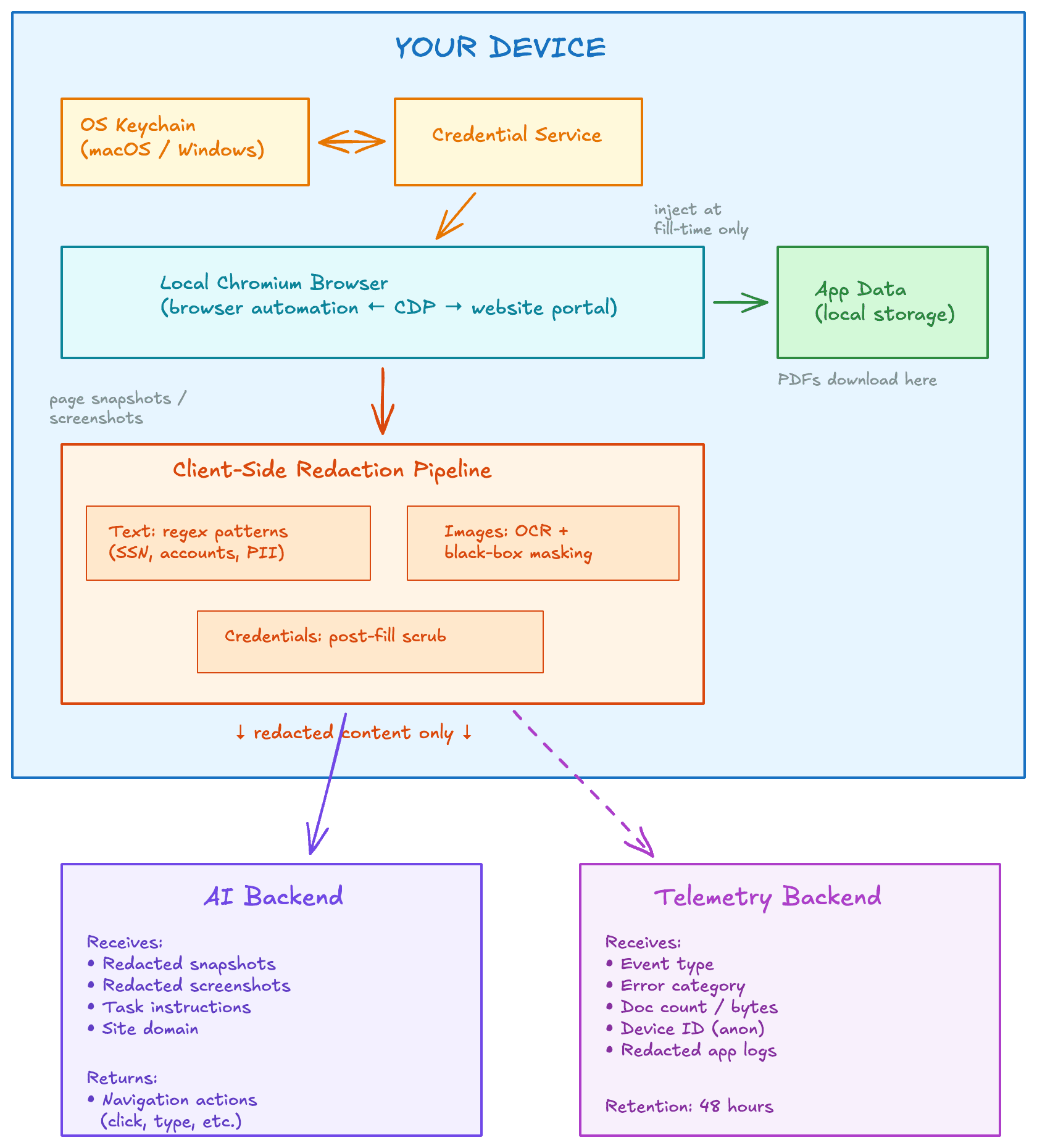
Classification
Data Classification
OS-encrypted DBdocuments/Local databaseLocal databaselogs/redaction/logs/Never sent: raw credentials, full account numbers, dollar amounts, SSNs, or downloaded documents
sync_completed, login_failed)Operational monitoringNever sent: document content, credentials, financial amounts, PII
Common Questions
FAQ
Where are my credentials stored?
Encrypted with your OS keychain (macOS Keychain or Windows Credential Store) and stored in a local database on your device. They never leave your machine.
Do you ever see my bank statements or documents?
No. PDFs, statements, and invoices download directly from your financial portal to your local file system. They are never uploaded to our servers or any cloud storage.
Where does the browser run?
Entirely on your machine. It is a local Chromium instance — the same open-source browser engine behind Chrome. No remote browser or VM is involved.
What does the AI actually see?
Only redacted page content. Account numbers, SSNs, balances, phone numbers, emails, and other sensitive patterns are scrubbed or masked client-side before anything is sent to the AI.
Are my credentials ever in AI prompts?
No. The AI prompt contains placeholder tokens only. Real credentials are injected at the instant the browser fills a form field and immediately scrubbed from tool outputs, so they never appear in the conversation history.
Do downloads go through your servers?
No. We do not operate an intermediate server or “document cloud.” The browser connects directly to your financial portal and saves files to your local disk.
What telemetry do you collect?
Only operational metadata: event types, error categories, document counts, and timing. No financial data, credentials, or document content is ever included.
What about app logs?
Remote app logs are redacted through the same pattern engine before shipping and auto-deleted after 48 hours.
Does the automation browser share my personal browser profile?
No. The automation browser runs in a clean Chromium instance managed by the app. Each agent run gets a fresh browser context — no cookies, extensions, or sessions carry over from your personal browser or between runs.